
Speed & Core Web Vitals
WooCommerce Speed Optimization & Core Web Vitals Fixes
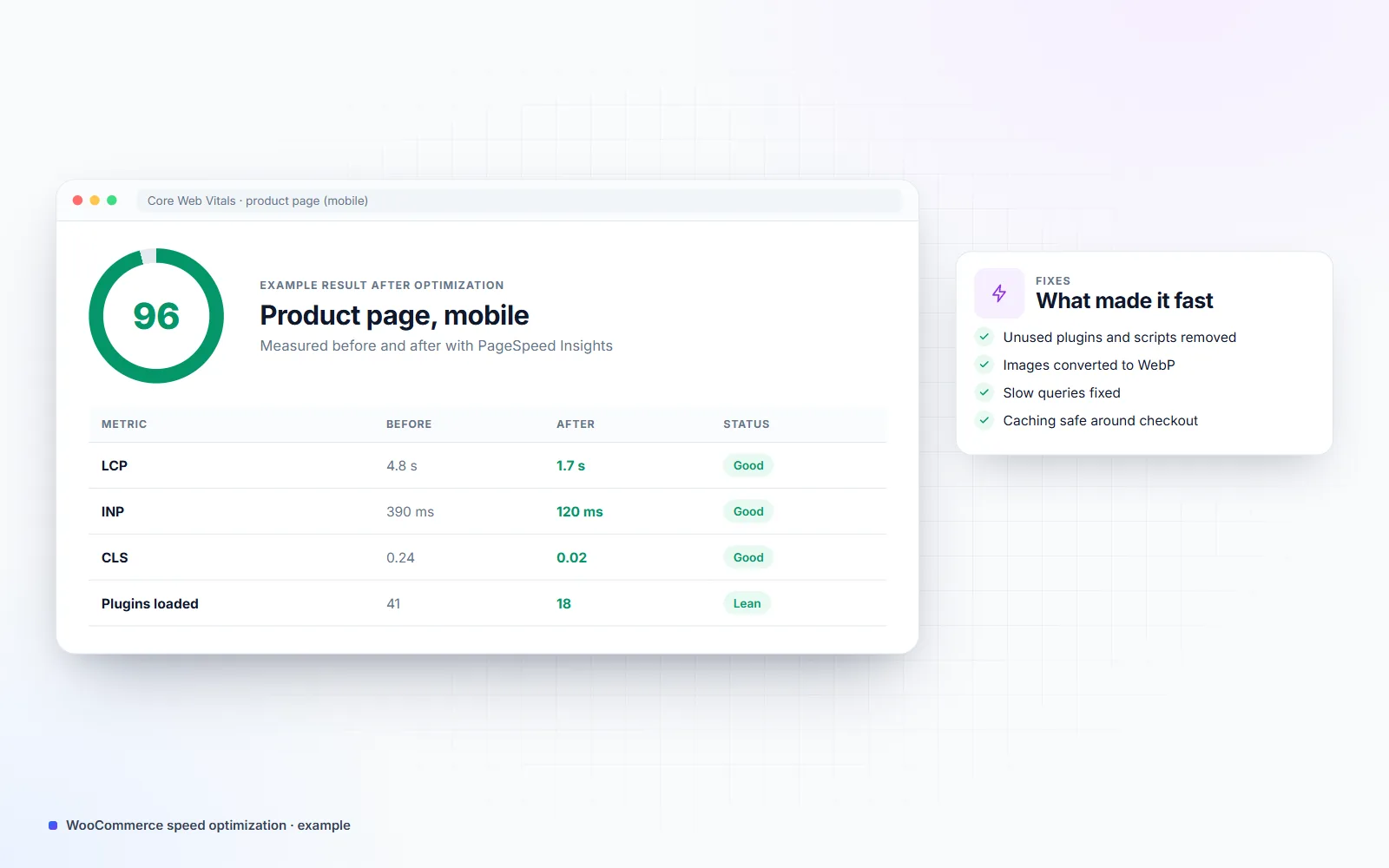
My WooCommerce speed optimization makes slow stores fast by finding what actually slows them down — heavy plugins, unoptimized images, slow database queries, render-blocking scripts or the wrong hosting setup — and fixing it, then proving the result with before-and-after Core Web Vitals and real page load times.
- Building for clients since 2021
- 25+ live client websites
- Clients in the US, UK, Canada & Europe
Is this you?
The problems this solves
Product pages load slowly on mobile
Shoppers wait for images and scripts before they can add to cart.
Core Web Vitals failing in Search Console
LCP, INP or CLS marked "Poor" for many URLs.
A caching plugin didn't fix it
Speed scores improved a little, but the cart and checkout are still slow.
What you get
What's included
-
Performance audit
Measured with PageSpeed Insights, Search Console data and server timing to find the real bottlenecks.
-
Plugin and script cleanup
Unused plugins removed and scripts loaded only on the pages that need them.
-
Image optimization
Modern formats like WebP, correct sizes and lazy loading.
-
Database and query fixes
Slow queries, bloated tables and expired transients cleaned up.
-
Caching and CDN setup
Page, object and browser caching configured safely around cart and checkout.
-
Before-and-after report
Scores and real load times, before and after.
- PageSpeed Insights
- Lighthouse
- Search Console Core Web Vitals
- Query Monitor
- WP-CLI
- LiteSpeed Cache
- Cloudflare
- WebP
Real projects
Proof from live websites


Process
How we work together
-
01
Measure
Baseline Core Web Vitals and load times for key pages.
-
02
Find the causes
Profile plugins, queries, scripts and hosting.
-
03
Fix
The biggest causes first, tested on staging.
-
04
Prove
Re-measure and deliver the before-and-after report.
Why WooCommerce stores get slow
WooCommerce itself is fast enough for most stores. Stores get slow because of what’s added over time: plugins that load scripts on every page, page-builder layouts with heavy markup, large images, product filters that run expensive database queries and hosting without object caching. Each one adds a little; together they make mobile shoppers wait.
Measure first, then fix
I start from data — Search Console’s Core Web Vitals report, PageSpeed Insights and server timing — so the work goes where it makes the biggest difference. You get a report with the before-and-after numbers for your most important pages: home, category, product, cart and checkout. More on WooCommerce development.
Pricing
How much does it cost?
Clear starting prices in USD. You get a fixed quote before any work starts, and nothing is billed until you approve it.
Speed Fix
From $300
Quick wins for a slow store.
- Performance audit
- Image and script fixes
- Caching setup
- Before-and-after report
Deep Performance Work
From $700
For stores with serious speed problems.
- Everything in Speed Fix
- Database and query optimization
- Plugin replacement where needed
- Core Web Vitals follow-up after 28 days
FAQ
Frequently asked questions
What are Core Web Vitals?
Google's three page-experience metrics: LCP (how fast the main content appears), INP (how fast the page responds to clicks and taps) and CLS (how much the layout jumps while loading). Google measures them from real Chrome users.
Isn't a caching plugin enough?
Caching helps pages that are the same for everyone, but cart, checkout and account pages can't be fully cached. If plugins, queries or scripts are heavy, those pages stay slow, and that's where most revenue is lost.
Do I need new hosting?
Sometimes, but not always. I fix the site first; if the server is still the bottleneck, I'll tell you exactly what kind of hosting you need.
Will speed work break my store?
Every change is made and tested on a staging copy first, including cart and checkout, before it goes live.
Related services
All services →How fast could your store be?
Send me your store URL. I'll run a quick check and tell you the three things slowing it down most.