
AI Automation
AI Automation & AI Agents for Small Businesses
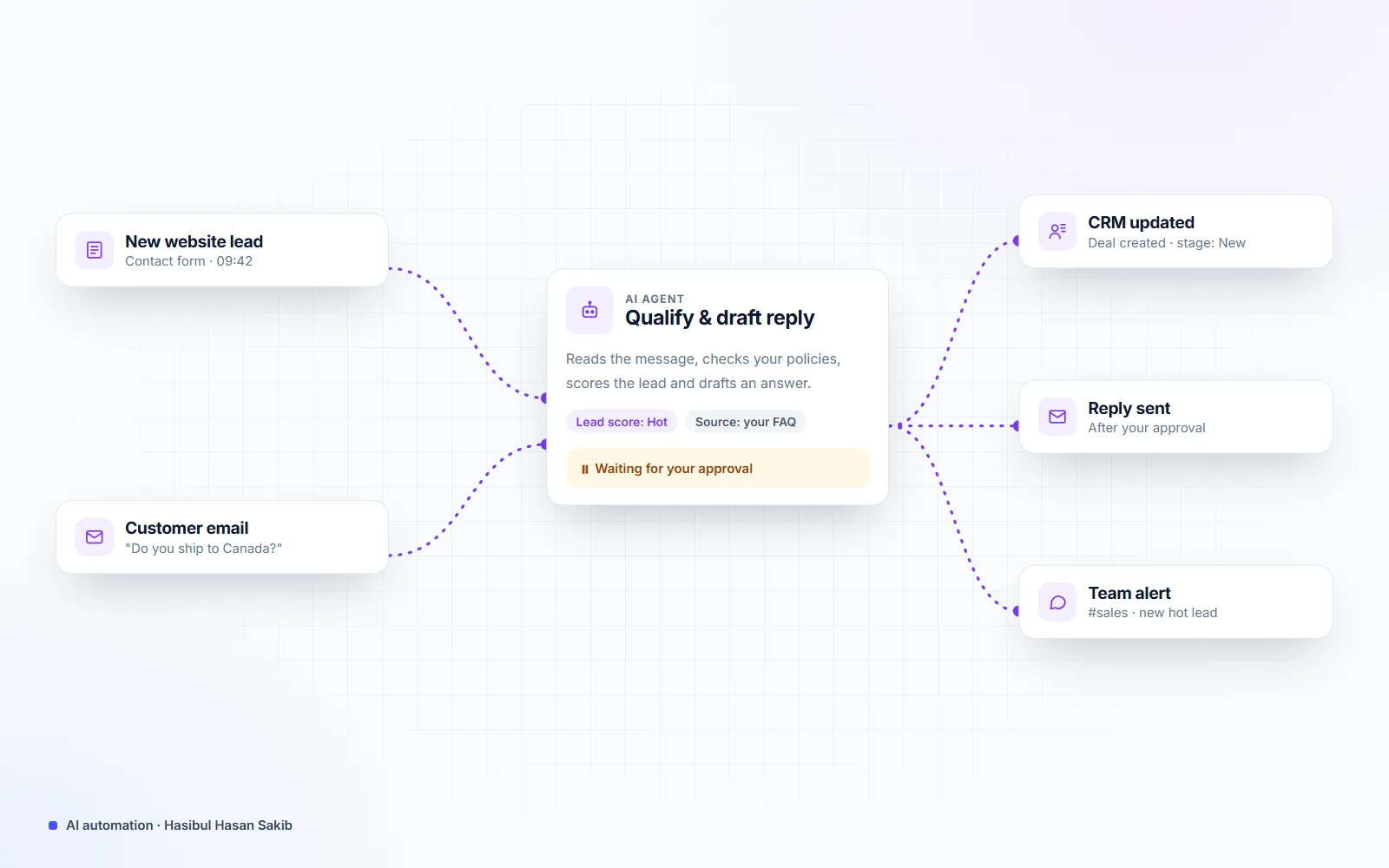
I build AI automation and AI agents that take repetitive work off your team — answering customer questions, qualifying leads, drafting emails and updating your CRM, store or spreadsheets. Everything connects to your WordPress or WooCommerce site and the tools you already use, is tested on real examples, and a person approves anything important before it goes out.
- Building for clients since 2021
- 25+ live client websites
- Clients in the US, UK, Canada & Europe
- WooCommerce products given SEO titles and descriptions through the API
- 17,000+
- social platforms run from one posting and inbox tool I built
- 5
- client sites added to Google Search Console in one automated run
- 26
Is this you?
The problems this solves
Your team copies the same data between tools every day
Website leads arrive by email and get typed into a CRM or spreadsheet by hand — slow, and some get missed.
Customers wait hours for simple answers
Questions about prices, delivery or availability pile up in the inbox and chat while you're busy.
You tried a chatbot and it made things up
Generic AI tools answer confidently from the open internet instead of from your own products and policies.
Your no-code automations keep breaking
A long chain of Zapier steps fails silently, and nobody notices until a customer complains.
What you get
What this service covers
Specialized services
AI Chatbot for WordPress & WooCommerce
An AI assistant on your site that answers from your own content, captures leads and hands off to a person.
Learn moreWorkflow Automation (n8n, Make & Custom Code)
Connect your website, CRM, email, spreadsheets and store so data moves on its own — with logs and alerts.
Learn moreWhat's included
-
AI chatbot trained on your content
Answers only from your pages, policies and products, with a hand-off to a person when needed.
-
Lead capture and qualification
New enquiries are scored, summarized and routed to the right person or CRM stage automatically.
-
Email and message drafting
AI drafts replies and follow-ups in your tone, and you approve them before anything is sent.
-
Store and content automation
Product descriptions, SEO titles, categories and order updates at scale, generated from your real product data.
-
Workflow automation
n8n, Make, Zapier or custom code connecting your site, CRM, email, Google Sheets, Slack and WhatsApp.
-
Custom AI agents
Multi-step agents that use your tools — search, CRM, calendar, store — with clear limits, logs and approvals.
-
Testing and guardrails
Every automation is tested on real past examples; risky actions need a human approval and every run is logged.
-
Hand-over and monitoring
Documentation, a short video walkthrough and alerts when something fails.
- OpenAI API
- Claude API
- n8n
- Make
- Zapier
- WordPress
- WooCommerce
- PHP
- Node.js
- REST APIs
- Webhooks
- Google Sheets
- HubSpot
- Slack
Process
How we work together
-
01
Free 30-minute call
We find the one or two tasks where automation saves the most time and check your tools and data.
-
02
Plan and fixed quote
A written plan: what the automation does, what it never does, the tools, the running costs and a fixed price.
-
03
Build and test on real data
I build on a test copy, run it against real past examples and fix the edge cases before launch.
-
04
Launch, monitor, improve
We switch it on with logging and alerts, review the first week together and tune it.
What is AI automation for a small business?
AI automation means handing the repetitive parts of your work to software that can read, write and make simple decisions. Classic automation moves data from A to B. AI automation also understands it: it can read an enquiry and tell a hot lead from spam, summarize a long email, answer a customer from your returns policy or write a product description from a spec sheet.
For a small business, the goal is simple: fewer hours on copy-and-paste work, faster replies to customers and fewer things falling through the cracks — without hiring.
Which tasks should you automate first?
Start with work that happens every day, follows the same pattern and costs real time. In most businesses that means:
- Customer questions about prices, delivery, opening hours, availability and order status.
- New leads from forms, chat and email that need sorting, a quick reply and a CRM entry.
- Follow-ups after a quote, a booking or an abandoned cart.
- Content at scale: product descriptions, SEO titles, category text and social posts from data you already have.
- Reporting: weekly numbers pulled from your store, ads and analytics into one summary.
Tasks that need real judgment, carry legal risk or happen once a month are usually better left with a person, or automated with an approval step.
AI chatbot, workflow or AI agent — which one do you need?
An AI chatbot sits on your website and answers visitors from your own content. Choose it when the same questions arrive every day. See AI chatbots for WordPress and WooCommerce.
A workflow automation runs in the background when something happens — a form is sent, an order is placed, a row is added — and moves and transforms the data. Choose it when people copy data between tools. See workflow automation with n8n, Make and custom code.
An AI agent combines both: it can look things up, decide the next step and act across several tools, within limits you set. Choose it for multi-step jobs such as researching a lead, drafting a tailored reply and booking the follow-up.
How I keep AI automations reliable
- Your data, your accounts. AI usage runs on your own API keys, so costs and data stay under your control, and OpenAI does not train its models on API data by default.
- Grounded answers. Assistants answer only from content you approve and say so when they don’t know.
- Human approval for anything that sends money, emails customers in bulk or changes records.
- Tested on real examples from your history before launch, not only on happy-path demos.
- Logs and alerts for every run, so a failure is noticed in minutes, not weeks.
Systems I’ve built and run
I use the same approach for my own business and my clients:
- A social media posting and inbox tool that publishes to Facebook, Instagram, LinkedIn, X and YouTube, schedules natively where the platform allows and collects comments and messages in one place.
- A scheduled job-monitoring agent that checks new freelance projects every 20 minutes, filters them against clear rules and drafts replies for approval.
- Product SEO at scale: SEO titles and meta descriptions for more than 17,000 WooCommerce products through the REST API, written only from real product data — no invented specs.
- An SEO automation tool for a marketing agency that manages technical SEO and content tasks across several client websites.
- Search Console automation that verified 26 client websites, submitted their sitemaps and sent their pages to Bing through IndexNow in one day.
Pricing
How much does it cost?
Clear starting prices in USD. You get a fixed quote before any work starts, and nothing is billed until you approve it.
Automation Sprint
From $350
One automated workflow, such as website lead → CRM → follow-up email.
- Discovery call and written plan
- One workflow, built and tested
- Error alerts and run logs
- Hand-over guide and video
AI Assistant
From $900
An AI chatbot or assistant that answers from your own content.
- Trained on your pages, FAQs and policies
- Website widget or WordPress integration
- Lead capture and human hand-off
- Conversation logs you can review
Custom AI Agent
From $2,500
A multi-step agent that works across your tools, with approvals.
- Access to your CRM, email, calendar or store
- Approval step for risky actions
- Full run history and alerts
- 30 days of tuning after launch
Compare
How this compares to your other options
| Question | Working with me | Off-the-shelf chatbot app | Large AI agency |
|---|---|---|---|
| Where answers come from | Your own content only, with sources | General AI knowledge, often guesses | Usually your content |
| Connects to your site and tools | Yes — WordPress, WooCommerce, CRM, email, any API | Built-in integrations only | Yes |
| Who owns it | You: your accounts, API keys and data | The app vendor | Often the agency's platform |
| How you pay | Fixed project price, AI usage on your own account | Monthly subscription | Larger project minimums |
| Human approval for risky actions | Built in | Rarely available | Depends on the team |
FAQ
Frequently asked questions
What can AI automation actually do for a small business?
The best results come from repetitive tasks with clear inputs: answering common customer questions, qualifying and routing leads, drafting replies, updating a CRM or spreadsheet, and creating product or SEO content from data you already have. I start with the task that eats the most hours each week, automate it end to end and measure the time saved before adding the next one.
Will an AI chatbot make up answers about my business?
Not the way I build them. The assistant only answers from content you approve — your pages, FAQs, policies and product data — and when it doesn't know, it says so and offers to connect the visitor with a person. Every conversation is logged, so you can check and improve the answers.
Do I need n8n, Make or Zapier?
Not always. For simple flows between popular apps, a no-code tool is quick and cheap. For anything that touches your website, store or customer data, I often write the automation as custom code inside WordPress or a small server script, which is faster, cheaper to run and doesn't break when a third-party step changes. I recommend the simplest option that will be reliable.
How much do the AI API costs add up to?
For most small businesses, a few dollars to a few tens of dollars a month. The AI usage runs on your own OpenAI or Anthropic account, so you see the exact cost and stay in control. I set usage limits and choose the right model for each step, so you don't pay for more power than a task needs.
Is my customer data safe?
Your data stays in your own systems and accounts. I send only the minimum a task needs to the AI model, use API settings that keep it out of model training, and keep API keys out of the code. For sensitive workflows, a person reviews the output before anything is sent or saved.
How long does an AI automation project take?
A single workflow usually takes one to two weeks from plan to launch. An AI assistant takes two to four weeks, and a custom agent four to eight weeks, depending on how many tools it connects to and how much testing it needs.
Can you add AI to my existing WordPress or WooCommerce site?
Yes. Most of my AI work is added to sites that already exist — a chat assistant, smart search, product-description generation, or automations triggered by forms and orders — without rebuilding the site.
What happens after launch?
You get documentation, alerts when something fails and a review of the first week's results. If you want me to keep improving it, the automation can be included in a monthly care plan.
Other services
All services →Find out which task to automate first
Book a free 30-minute call. We'll pick the task that costs you the most time, and you'll get a plan with a fixed price — whether or not we work together.